uploads
 Tradovate
How to Upload Tradovate Trades
Import your Tradovate futures trading history into TradeRonin using the Fill History export.
January 6, 2026
0 views
Step 1: Export from Tradovate
- Log in to Tradovate (web or desktop)
- Click Reports
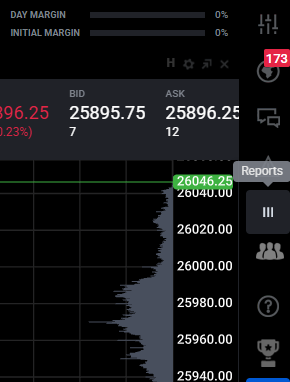
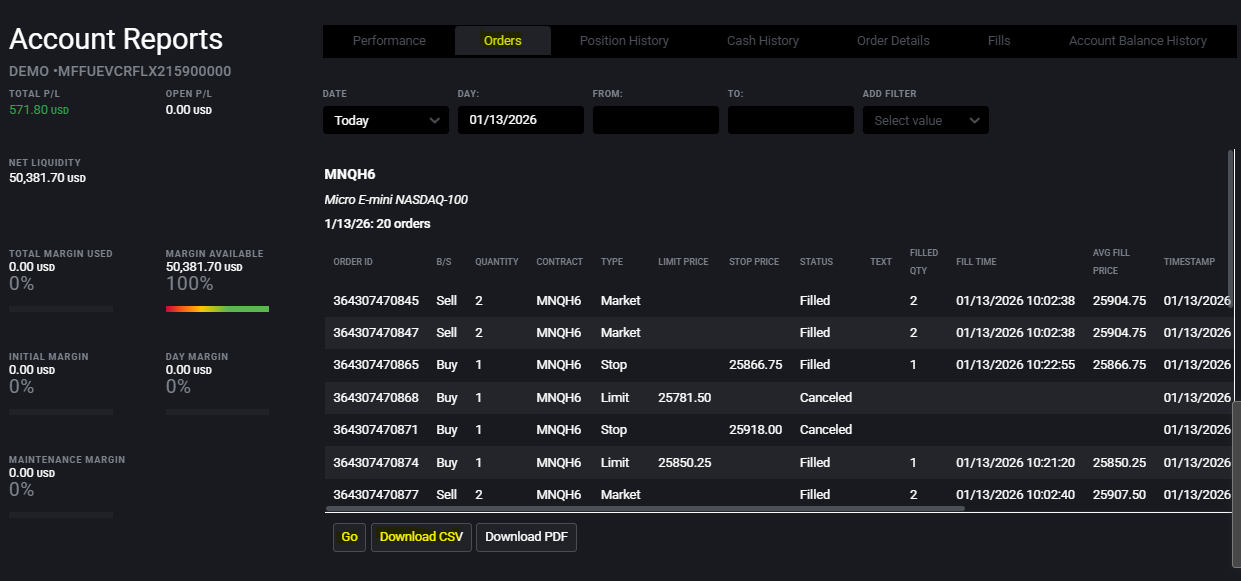
- Go to Orders tab
- Select your desired date range
- Click Go then Download CSV button
Step 2: Import into TradeRonin
If You Don't Have a Tradovate Account Yet
- Go to Settings → Accounts
- Click "+ Add Account"
- Select "Broker (CSV Upload)"
- Choose Tradovate from the broker list
- Select your file & Complete account setup
If You Already Have a Tradovate Account
- Go to Settings → Accounts
- Click on your existing Tradovate account
- Click "Upload CSV"
- Select your exported file
- Review and confirm
What Gets Imported
| Data | Included |
|---|---|
| Filled orders | ✅ Yes |
| Canceled orders | ❌ Skipped |
| Commission/fees | ✅ Auto-calculated |
| Futures contracts | ✅ Yes |
| Micro contracts | ✅ Yes |
Supported Futures
TradeRonin auto-detects multipliers for all Tradovate futures:
| Symbol | Product | Multiplier |
|---|---|---|
| MNQ | Micro E-mini NASDAQ | $2 |
| MES | Micro E-mini S&P 500 | $5 |
| NQ | E-mini NASDAQ | $20 |
| ES | E-mini S&P 500 | $50 |
| CL | Crude Oil | $1000 |
| GC | Gold | $100 |
All CME, CBOT, NYMEX, and COMEX products are supported.
Required Columns
TradeRonin automatically detects these columns:
- B/S — Buy or Sell
- Contract — Full symbol with expiry (e.g.,
MNQU5) - avgPrice or Avg Fill Price — Execution price
- filledQty or Filled Qty — Quantity filled
- Fill Time or Timestamp — Execution time
Sample CSV Format
orderId,Account,B/S,Contract,Product,avgPrice,filledQty,Fill Time,Status
284301090007,DEMO123, Buy,MNQU5,MNQ,24018.25,2,09/12/2025 09:42:07, Filled
284301090042,DEMO123, Sell,MNQU5,MNQ,24067.0,2,09/12/2025 10:27:05, Filled
Troubleshooting
"No valid trades found"
- Ensure you exported Fill History (not Order History)
- Check that orders have status "Filled"
"Missing required columns"
Required: B/S, Contract, avgPrice, filledQty, Fill Time
Duplicate Trades
Re-uploading the same file won't create duplicates. TradeRonin uses the Order ID for deduplication.
Need Help?
Contact support with:
- First few rows of your exported CSV
- The error message you're seeing